
Smart mapping
AI matches Umsatz, Belegdatum, and Buchungstext.
No credit card required.

5 pages to analyze

Your document is being analysed. While you wait, you can enter your email address to ensure the results are assigned correctly.
A token is sent to your email address. Please enter this token below to verify your address.
Thank you! The extraction job is running.
View resultsStop manually typing booking data. Upload your bank statements, credit card bills, or invoices as PDF, and convert them seamlessly into the official DATEV EXTF format. Ready for immediate import by tax advisors and German accountants.
| Umsatz | Soll/Haben | BU-Schlüssel | Belegdatum | Konto |
|---|---|---|---|---|
| 1250,00 | S | 9 | 1503 | 8400 |
| 45,99 | H | 9 | 1603 | 4900 |
| 3200,50 | S | 8 | 1803 | 8300 |
| 89,70 | H | 9 | 2103 | 4930 |
| 560,00 | S | 9 | 2203 | 8400 |
| 149,99 | H | 9 | 2303 | 4950 |
| 980,25 | S | 8 | 2403 | 8300 |
| 72,10 | H | 9 | 2503 | 4925 |
| 430,00 | S | 9 | 2603 | 8400 |
| 215,60 | H | 2703 | 4980 | |
| 1750,00 | S | 8 | 2803 | 8300 |
Convert tables from PDFs to Excel, CSV, JSON or DATEV in 3 easy steps
Upload the PDF invoices or bank statements.
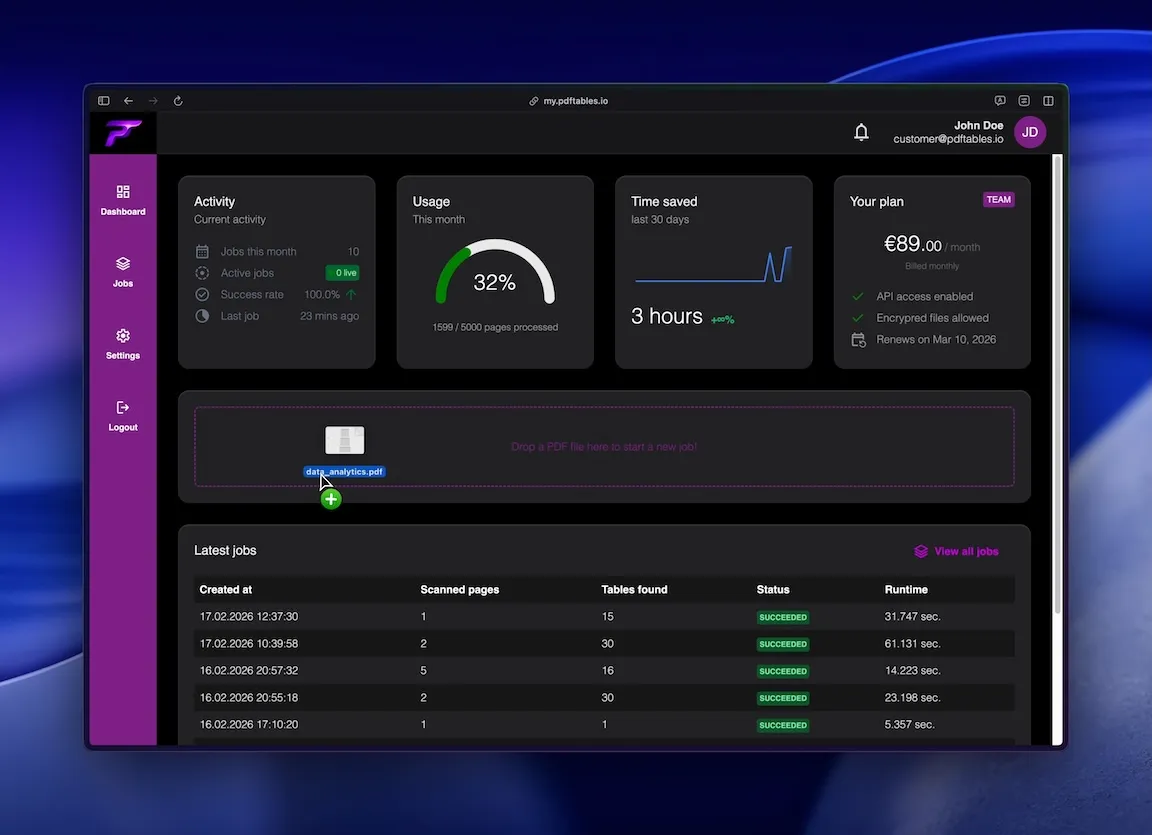
We extract the tables and AI automatically maps columns to DATEV standards.
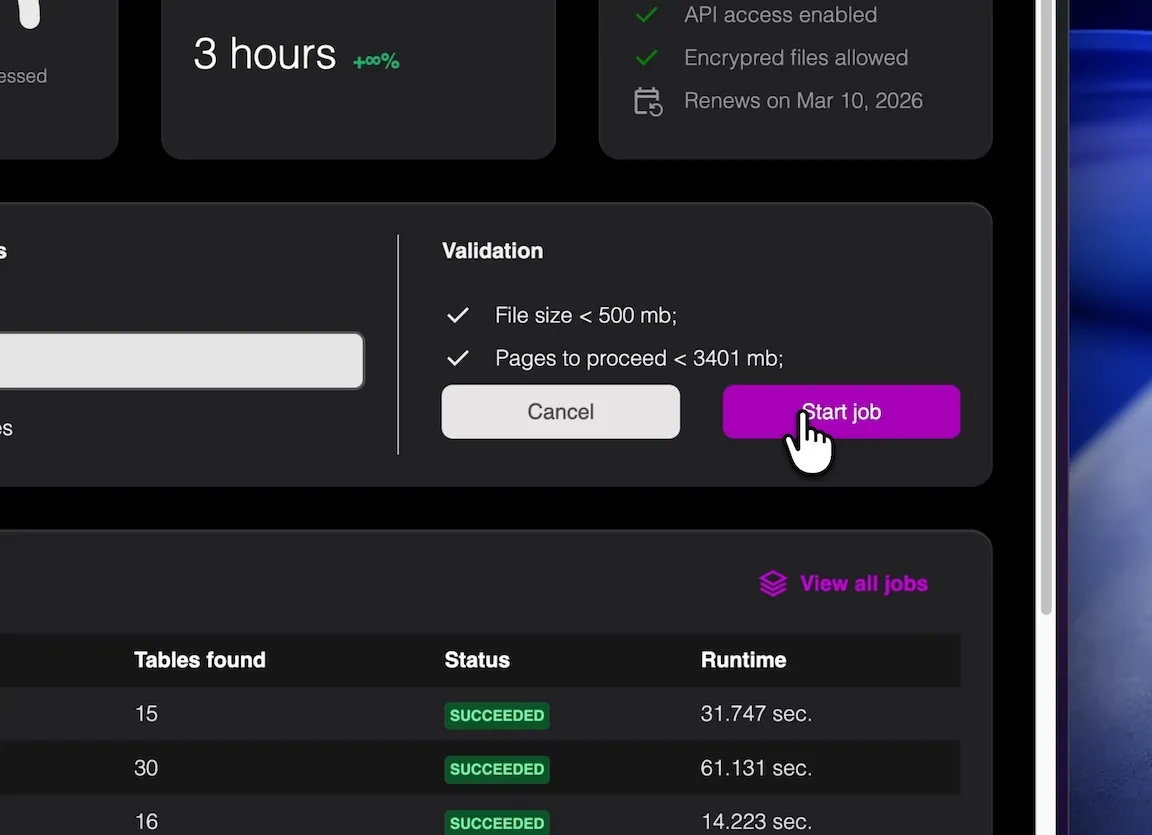
Download a fully compliant DATEV Buchungsstapel CSV.
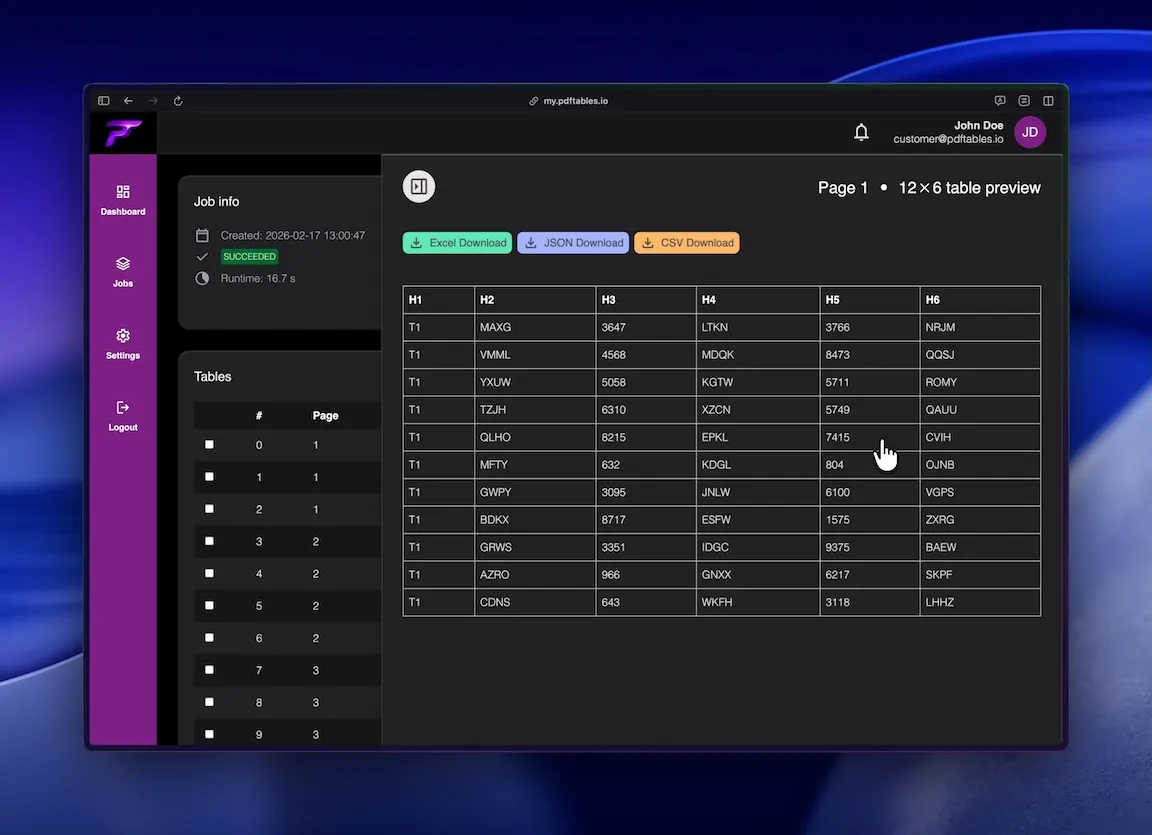
Digitize client documents quickly without a full DATEV Unternehmen Online setup.
Process recurring supplier invoices or credit card statements faster.
Prepare your bookkeeping easily before sending it to your Steuerberater.
Precise table extraction like enterprise software and easy to use as a simple tool.
AI matches Umsatz, Belegdatum, and Buchungstext.

Maps 19% or 7% to DATEV BU-Schlüssel 9 or 8.

2 header rows, semicolon delimiter, correct date formats, and clean umlauts.
This is all you need: Upload a file, receive a job_id, poll status, and download extracted tables in the format you
need.
POST /v1/uploadGET /v1/extraction/{job_id}GET /v1/download/{table_id}?format=xlsx|csv|json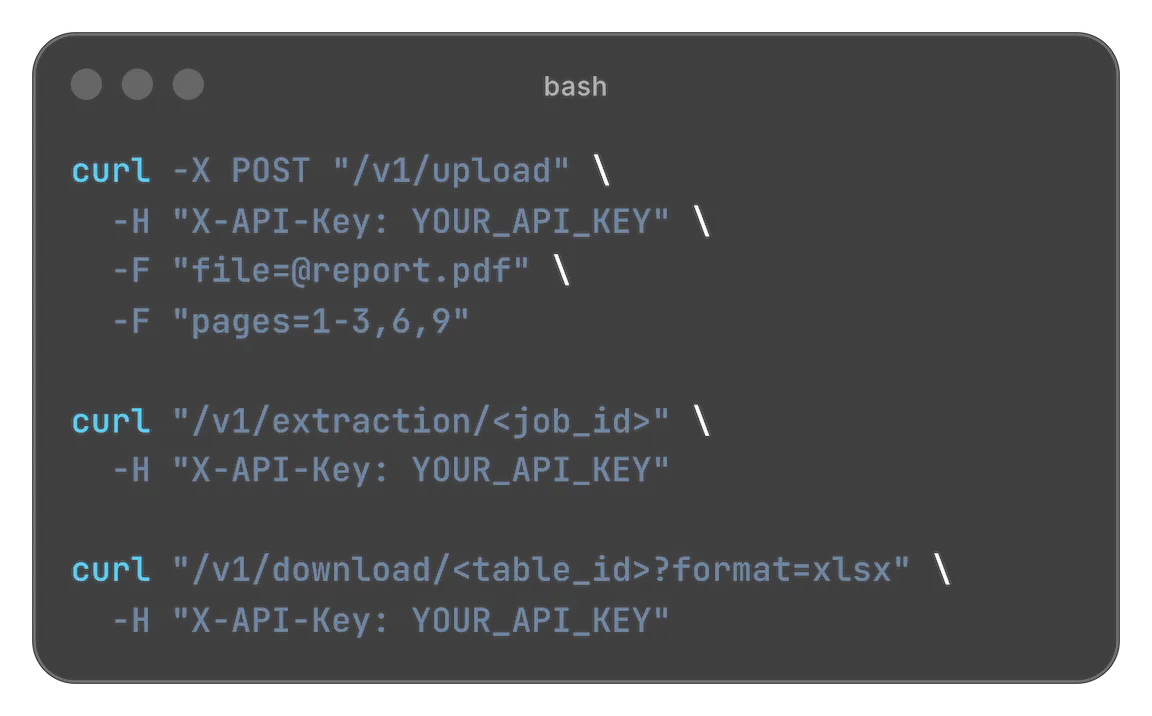
Designed for easy usage combined with powerful performance

 Security & privacy: Files processed securely. Data retention configurable.
Many businesses receive invoices, credit card statements, expense reports, or booking summaries as PDFs. While these documents contain all necessary accounting information, the data is usually locked inside a non-editable format. For companies and tax advisors working with DATEV, this often means manually transferring the numbers into accounting software. pdftables.io solves this problem by converting tables from PDFs directly into a DATEV-compatible export file. Instead of retyping booking data line by line, you can transform structured tables from a PDF into a format that can be imported into DATEV within seconds.
Accounting workflows in Germany frequently rely on DATEV, especially for bookkeeping, tax consulting, and financial reporting. However, many source documents such as supplier invoices, payment provider reports, or bank summaries arrive as PDF files. While PDFs are great for sharing documents, they are not designed for structured data processing. The numbers and columns that are visually aligned in a PDF cannot easily be transferred into accounting software.
As a result, many accountants and small businesses still rely on manual work. Someone opens the PDF, reads each line, and types the values into the accounting system. This process is slow and introduces a high risk of errors. A single misplaced decimal point or incorrect account number can create inconsistencies that later require additional reconciliation work.
Another common workaround is copying data from a PDF into Excel. Unfortunately, PDFs rarely contain real tables. When copied, columns often break apart, numbers shift positions, and header rows become misaligned. Cleaning up the spreadsheet may take almost as long as entering the data manually.
Even if the table can be extracted successfully, the data still needs to be prepared for DATEV. The DATEV import format requires specific columns such as amount, account numbers, booking text, tax information, and booking indicators. Mapping these fields manually adds another layer of complexity.
pdftables.io provides a simple solution for converting PDF tables into structured accounting data. Instead of typing values manually, you upload the PDF and extract the table directly from the document. The system analyzes the table structure and converts the rows into a format that matches the requirements for DATEV imports.
Typical data that can be converted includes invoice amounts, booking descriptions, booking dates, account numbers, and tax indicators. Once the table is recognized, the tool generates a clean dataset that can be exported as a DATEV-compatible file. This makes it possible to transfer bookkeeping information from PDFs into DATEV without manually rewriting every entry.
The conversion process ensures that numeric values remain intact and that columns stay aligned. Dates, amounts, and text fields are standardized so they can be imported into accounting software without additional formatting work. Instead of spending time correcting spreadsheet errors, you receive structured data that is ready for accounting workflows.
This approach is especially helpful for businesses that receive recurring financial reports as PDFs. Examples include payment provider summaries, marketplace reports, supplier invoice lists, expense statements, or bank export documents. In many of these cases the relevant information is already presented in tables inside the PDF. pdftables.io simply extracts that table and converts it into usable accounting data.
Many businesses face the same situation every month: they receive dozens or hundreds of documents containing structured financial data, but those documents are stored as PDFs. For example, suppliers may send invoice lists, payment processors may generate monthly summaries, and internal systems might export booking reports as PDF tables.
These documents often contain exactly the information that needs to be imported into accounting software. However, because the data is embedded in a PDF layout, it cannot easily be transferred to DATEV. Extracting the tables manually becomes a repetitive task that takes valuable time.
Converting PDF tables to DATEV is particularly useful for tax advisors who receive documents from many clients. Each client might use different systems or formats, but many reports ultimately end up as PDFs. With a reliable PDF-to-DATEV workflow, those reports can be converted into structured booking data quickly.
Small and medium-sized businesses also benefit from this automation. Instead of spending hours preparing accounting data, employees can focus on reviewing and validating the numbers rather than entering them manually.
The process of converting a PDF into a DATEV-compatible file is straightforward. First, upload the PDF that contains the table with the accounting data. The system identifies the table structure and extracts the rows and columns from the document.
Next, the extracted data is organized into a structured dataset. Amounts, booking texts, dates, and account numbers are separated into individual columns so they can be processed by accounting software. The resulting dataset reflects the same information that was originally visible in the PDF table.
Finally, the table can be exported in a format that can be imported into DATEV. Instead of working with an unstructured PDF document, you receive a clean file that contains all booking entries in a consistent structure.
This workflow significantly reduces the time required to prepare accounting data. Instead of copying numbers manually or fixing broken spreadsheets, you can move directly from a PDF document to structured bookkeeping data.
Automating the conversion from PDF to DATEV offers several practical benefits for accounting teams and businesses. The most obvious advantage is time savings. Extracting tables automatically is significantly faster than typing each booking line manually.
Another important benefit is accuracy. Manual data entry always carries the risk of typing mistakes. When numbers are transferred automatically from the original document, the likelihood of errors decreases significantly.
Automation also improves consistency across accounting workflows. Instead of dealing with different spreadsheet formats or manual notes, all extracted tables follow the same structured format. This makes it easier to review, validate, and import the data into accounting systems.
Finally, converting PDF tables to DATEV helps streamline collaboration between businesses and tax advisors. When financial data can be exported in a structured format, it becomes easier to exchange and process accounting information without additional preparation steps.
PDF documents are widely used because they preserve layout and formatting. However, this same characteristic makes them difficult to process automatically. Tables that look perfectly structured on screen are not always stored as structured data internally.
By extracting tables directly from PDFs and converting them into a structured format, businesses can unlock the information contained in those documents. Instead of treating PDFs as static files, they become a source of usable data that can feed directly into accounting workflows.
For companies working with DATEV, this means fewer manual steps and faster bookkeeping processes. Financial tables from invoices, reports, and summaries can be transformed into importable accounting data without rewriting the information manually.
With the right tools, converting PDF tables to DATEV becomes a straightforward part of the accounting workflow. Instead of spending time on repetitive data entry, teams can focus on analyzing and managing their financial information.
Start free. Upgrade when you need more.
$0 forever
High quality extractionOCR (for scanned documents)Data previewXLS, CSV and JSON download Up to 5 pages/month1 DATEV exports/monthUp to 10 MB per file
 No API accessNo encrypted files supported
$19.90 / month
or
$149 / year
High quality extractionOCR (for scanned documents)Data previewXLS, CSV and JSON downloadUp to 500 pages/monthUp to 100 DATEV exports/monthUp to 50 MB per fileAPI access enabledNo encrypted files supported$89 / month
or
$999 / year
High quality extractionOCR (for scanned documents)Data previewXLS, CSV and JSON downloadUp to 5000 pages/monthUp to 1000 DATEV exports/monthUp to 500 MB per fileAPI access enabledEncrypted files supportedNeed more pages? Feature request? Contact us.
The export uses official DATEV EXTF (Buchungsstapel) structure: semicolon-delimited CSV with the required header rows and field order for DATEV import.
Yes. The system recognizes common VAT rates like 19% and 7% and maps them to the corresponding DATEV BU-Schlüssel.
Yes. You can extract booking tables from monthly credit card PDF statements and convert them into DATEV-ready data.
Yes. You can validate extracted rows, dates, amounts, and mapped fields before importing, which helps catch edge cases early.
Yes. It's well suited for repeated invoice and statement processing, helping teams standardize and speed up monthly bookkeeping handoffs.
Yes. You can process recurring sets of invoices, statements, and reports, then validate mapped fields before DATEV import.
Upload a PDF now and see the DATEV conversion in action.